Cooklist: Pantry & Cooking App
- 3.2
- Rating
- 500.00K
- Installs
- Free
- Price

 Analysis by App-foxy
I tried Cooklist: Pantry & Cooking App as a practical kitchen companion rather than treating it like another collection of recipes. The idea is appealing: connect the food already at home with meal planning and grocery preparation, so dinner starts with what I can actually use instead of what happens to look good in a recipe feed. That makes it especially relevant for busy households, people trying to reduce forgotten groceries, and anyone who repeatedly buys ingredients they already have.
Cooklist is a free Food & Drink app from Cooklist, available to everyone and compatible with Android 8.0 or later. It has passed the half-million-install mark, which suggests that the concept has found a real audience, although its average rating of 3.1 shows that the experience is not equally smooth for every user. I would describe it as a useful planning tool with a learning curve, not as a complete replacement for a supermarket app, a handwritten pantry list, or a favorite recipe website.
How Cooklist fits into an everyday kitchen routine
The central workflow is simple to understand. I begin with the ingredients I have, look for meals that make sense around them, and then turn the missing items into a shopping plan. In practice, the value comes from connecting those steps. Many recipe apps stop once I choose a dish, while ordinary notes apps make me manually convert that dish into a list. Cooklist is designed to bridge that gap.
You May Also Like

 Blood Strike: 2.5 Anniversary
Blood Strike’s Loadouts Turn Every Drop Into a Tactical Gamble
A close look at Blood Strike’s custom loadouts: how fast access to signature weapons reshapes its battle royale rhythm, rewards preparation, and narrows the gap between fights.

 Pandora - Music & Podcasts
Pandora’s Music Is Easy to Start, but Harder to Recover
Pandora’s strength is its low-effort path from a seed to a station. Its weak spot is how much confidence it asks you to place in connection, setup, and quiet recovery.

 8 Ball Pool
 Is Built on Rivalries, Rematches, and Routine
A close look at the rivalries, rematches, shared routines, and unanswered safety questions that turn a quick pool match into a persistent mobile community.

 Samsung Music
’s Quiet Strength Is Playing What You Already Own
Its reach comes less from spectacle than from dependable access to a personal library. That simplicity is both the app’s strongest retention engine and its ceiling.

 AccuWeather: Weather Radar
AccuWeather Review: A Quick, Clear Forecast for Everyday Decisions
For everyday plans, the best forecast is the one you can understand quickly. AccuWeather makes rain timing, radar, and local conditions easy to act on, with a few trade-offs.

 Hill Climb Racing
Why Hill Climb Racing Still Turns Crashes Into One More Run
A tiny car, a bumpy hill and one more upgrade: Hill Climb Racing keeps resurfacing because its simple chaos makes every near-miss feel personal.
More From Our News Desk
View All News


That distinction matters most when the kitchen is in an in-between state. I may have pasta, a few vegetables, and an opened sauce, but no clear idea for dinner. Instead of searching broadly and then discovering that half the ingredients are missing, I can use the pantry-first approach to narrow the options. It is a small change in thinking, but it can make meal planning feel less wasteful and less dependent on impulse shopping.
I would not expect the app to make every meal decision automatically. Pantry information is only useful when it is reasonably accurate, and that means the initial setup takes attention. If I add items carelessly, forget to remove something after using it, or enter a broad ingredient when the recipe needs a particular form, the suggestions and shopping list become less trustworthy. The app rewards regular maintenance more than occasional use.
A realistic example is a weekday evening after work. I have chicken, rice, carrots, and a few condiments, but I am tired and do not want to browse dozens of unrelated recipes. Cooklist can help me start from those available ingredients, identify what would complete a meal, and separate the needed purchases from what is already in the kitchen. The useful part is not just finding a recipe; it is reducing the number of small decisions between “I need dinner” and “I know what to buy.”
Free access and the paid-value question
Cooklist is free to download, so the basic decision is easy: there is no purchase required simply to try the service. That makes it reasonable for someone who wants to test whether pantry-based planning fits their habits before committing time to a new system. The app also includes in-app purchases ranging from $5.99 to $59.99 per item, so the free entry point should not be confused with an entirely cost-free experience at every level.
I would approach those purchases carefully. The listed range tells me that optional paid value exists, but it does not by itself prove that paying will solve every frustration or suit every household. My advice is to use the free experience long enough to answer practical questions: Do I actually keep the pantry current? Do the recipe suggestions match the food I buy? Does the resulting grocery workflow save me effort compared with my current method? If the answer is no, paying is unlikely to fix the underlying mismatch.
For a person who already enjoys planning meals and wants a more connected process, paid access may be easier to justify if the available upgrade fits their routine. For someone who only needs a short shopping list, a basic notes app may deliver the same value without adding another food database to maintain. The important distinction is between paying for convenience that I will use every week and paying because the app feels promising after a few minutes.
In other words, the free version is best treated as a trial of the workflow, not merely a limited sample of recipes. I would judge it by how quickly I can turn real pantry contents into a usable dinner plan. That is a more meaningful test than browsing attractive meal ideas, because browsing is easy while maintaining a useful inventory is where the long-term commitment appears.
Where the app delivers more value than ordinary alternatives
The strongest advantage is the connection between discovery and preparation. With a normal recipe site, I might save a dish but still need to inspect the ingredients, check the cupboards, and create a shopping list manually. With a basic checklist, I can record what to buy but receive no help deciding what to cook. Cooklist sits between those approaches by treating recipes, pantry contents, and shopping as parts of one activity.
That connection is particularly helpful for reducing duplicate purchases. Before shopping, I can use the pantry view as a checkpoint rather than relying on memory. This is a non-obvious benefit because the app is not only about finding dinner; it can also change the order of operations. I check what is available first, choose meals second, and shop last. That sequence is more disciplined than opening a recipe feed while standing in a store.
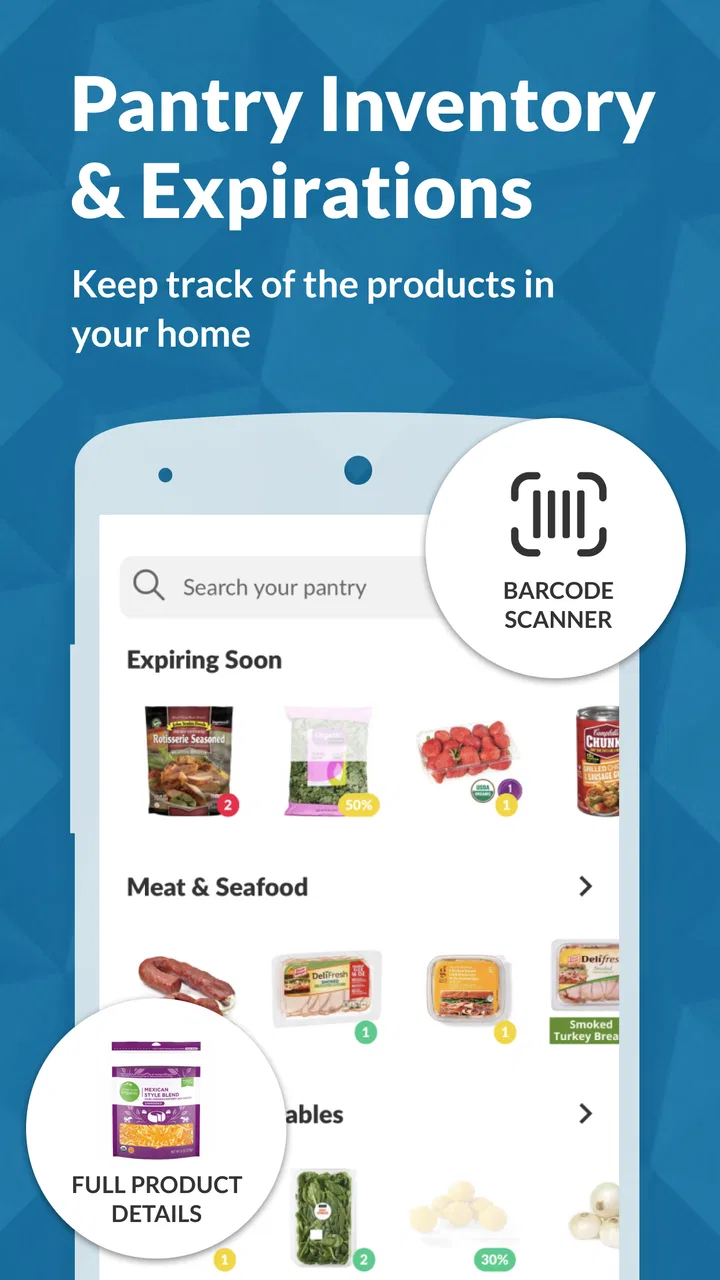
Another useful tactic is to plan around ingredients that need attention. Fresh food often becomes waste because it is not visible when I am choosing meals. A pantry-centered system gives me a reason to look at what is already present before adding something new. I would still verify quantities and freshness myself, but the workflow encourages better use of food that might otherwise be forgotten.
The grocery-list step can also help when more than one person shops. A shared plan is easier to follow than a conversation full of “Do we have that?” messages, provided everyone keeps the inventory and list updated. I would use it as the household’s working list, then quickly review it before leaving because recipe-based lists can include items that are technically present but not in a usable amount.
Cooklist is also more useful for flexible cooks than for people who follow recipes with absolute precision. If I am comfortable substituting vegetables, changing seasonings, or adapting a meal to what is available, pantry-driven suggestions can spark practical ideas. If I need exact brands, exact quantities, or a tightly controlled cooking plan, I would treat its suggestions as a starting point and verify the details independently.
The friction that affects real-world usefulness
The biggest trade-off is the effort required to keep the pantry meaningful. Any app that promises decisions based on what I own depends on accurate input. That is not a flaw unique to Cooklist, but it is central to judging this particular app. If entering and updating items feels like a chore, the system gradually becomes a record of what I used to have rather than what is available now.
I would avoid adding every minor item at the beginning. A better approach is to enter the ingredients that shape dinner decisions: proteins, grains, vegetables, sauces, and other items I regularly build meals around. Once that core is reliable, I can add more detail where it genuinely improves suggestions. This staged setup is one of the most practical ways to avoid abandoning the app during the first week.
There is also a difference between having an ingredient and having enough of it. A pantry list may say that rice or cheese is available, but a planned recipe can require more than I have left. I would therefore use the list as a memory aid, not as an unquestioned inventory audit. Before shopping, I would check partial packages, opened products, and items near their use-by point.
Recipe discovery can bring another compromise. A large set of possibilities sounds helpful, but too many choices can create the same decision fatigue as a conventional recipe app. I get better results by starting with a constraint: one ingredient to use soon, one cooking method, or a maximum number of new items to buy. That turns the app from an endless browsing tool into a focused planning assistant.
The average rating of 3.1 is worth considering before installing. It does not tell me exactly which problems affected individual users, but it does signal that expectations should be realistic. I would not choose Cooklist if I wanted a completely frictionless experience that requires no setup or maintenance. Its concept is strongest when I am willing to participate in the organization rather than expecting the app to infer everything automatically.
Who is most likely to get their money’s worth
I think Cooklist is a good fit for a household that cooks at home several times a week, buys overlapping ingredients, and wants a repeatable planning habit. It can also suit someone moving from scattered notes toward a more structured system. The benefit grows when the same person uses the pantry, recipe, and shopping parts together instead of treating them as separate features.
It is especially promising for people who dislike deciding what to cook from scratch every evening. A short planning session can turn a vague collection of ingredients into several possible meals and a more deliberate shopping trip. The app may also help families coordinate, although the household needs an agreed routine for updating what has been used and what has been purchased.
People trying to control food waste may find the pantry-first approach more valuable than simply collecting recipes. The key is to use it before shopping and before choosing new meals, not only after a purchase has already been made. I would also recommend it to flexible cooks who enjoy adapting recipes, because they are more likely to benefit from suggestions without becoming frustrated when every detail does not match their cupboards.
On the other hand, I would skip it if my needs are very narrow. Someone who wants only a fast, manually edited grocery checklist may find a notes app quicker. Someone who follows a strict diet, needs highly specialized nutrition information, or requires exact product-level tracking should compare it with a tool built specifically for that purpose. Likewise, a person who rarely cooks at home may not gain enough from maintaining a pantry inventory to justify the habit.
I would also hesitate if I shop spontaneously and do not want to plan. Cooklist is built around preparation, so its value is reduced when meals are decided in the supermarket or ordered at the last minute. That is not a criticism of its concept; it is a clear boundary. The app helps most when I want to make the kitchen more intentional, not when I want to avoid planning altogether.
Practical ways to test it without overcommitting
My recommended trial starts with one week of realistic information rather than a perfect inventory. Add the foods that are genuinely available, choose a small number of meals, and watch how much editing the shopping list requires. If the list is close to useful with only minor corrections, the workflow may be worth continuing. If every recipe requires rebuilding the list manually, the app is probably not saving enough time.
A second test is to plan around leftovers. After cooking, update what remains instead of pretending the original quantities are still intact. Then use those leftovers as the basis for the next meal search. This reveals whether the pantry approach works with imperfect, changing food supplies, which is more important than how well it handles a freshly entered inventory.
I would also separate “must buy” items from optional ingredients while reviewing a plan. That makes the list more practical for a budget-conscious trip and prevents a recipe suggestion from quietly expanding a small shopping run. The app can organize the plan, but I still make the final judgment about substitutions, quantities, dietary suitability, and what is worth purchasing.
Finally, I would not upgrade during the first session. Since optional purchases range from $5.99 to $59.99 per item, the sensible value check is behavioral: am I using the connected workflow repeatedly, or am I merely enjoying the novelty? Free access is enough to answer that question before spending money. If the habit does not form, the cheapest option is to stop using the app rather than trying to purchase a solution to an unused routine.
My verdict on Cooklist
Cooklist: Pantry & Cooking App is an interesting middle ground between a recipe browser, a pantry record, and a grocery planner. I like its underlying order of operations: use what is already available, decide what to cook, and then shop for the gaps. That is more practical than collecting recipes without checking the kitchen, and more helpful than keeping a shopping list with no meal context.
Its weakness is equally clear. The experience depends on ongoing input, and that makes it less effortless than the store summary might suggest. The app cannot make an accurate pantry-based plan from an outdated pantry. I would also keep expectations measured because the 3.1 average indicates a mixed reception, despite more than 500,000 installs and a substantial number of ratings.
My recommendation is to try the free version first and judge the workflow, not the promise. If I cook regularly, want to reduce duplicate purchases, and am willing to update the foods that matter, Cooklist can become a useful weekly planning tool. If I want a simple list, instant meal decisions, or highly specialized dietary control, another option may be a better match. For me, its value is real but conditional: it earns its place when I use the pantry, recipe, and grocery steps together, rather than expecting one tap to organize the entire kitchen.
The current version is 1.105.3, and the app was released on June 22, 2018, so it is an established product rather than a brand-new experiment. That makes the free trial even more sensible. I would install it, build a modest pantry, test one ordinary week, and only then decide whether its paid options offer enough extra convenience for my own cooking routine.
FAQs for Cooklist: Pantry & Cooking App
01What is Cooklist and how does it work?
Cooklist is a pantry management and meal planning app designed to streamline your cooking experience. It tracks the ingredients you have at home, suggests recipes based on those ingredients, and helps you plan meals throughout the week. Users can also connect it to grocery stores for easy shopping list creation.
02Is Cooklist available on both Android and iOS?
Yes, Cooklist is available for both Android and iOS devices. You can download it from the Google Play Store for Android or the Apple App Store for iOS. The app ensures a seamless experience across platforms, allowing users to manage their pantry and meal plans from any device.
03Do I need to pay for Cooklist, or is it free to use?
Cooklist offers a free version with basic features such as pantry tracking and recipe suggestions. However, there is a premium subscription available that unlocks additional functionalities like advanced meal planning, personalized recipe recommendations, and integration with more grocery stores for a comprehensive experience.
04Can Cooklist help me reduce food waste?
Absolutely. Cooklist helps you keep track of what ingredients you have and when they expire. By providing recipe suggestions based on your current inventory, it encourages you to use up ingredients before they go bad, significantly reducing food waste and saving money over time.
05How does Cooklist connect with grocery stores?
Cooklist can connect to various grocery stores, allowing you to sync your shopping lists with your preferred stores. This feature streamlines the shopping process by letting you order ingredients directly through the app or providing a detailed list to follow when shopping in-store, ensuring you never forget an item.
Pros
- Comprehensive recipe database.
- Syncs with grocery stores easily.
- Tracks expiration dates efficiently.
- Customizable meal planning feature.
- User-friendly interface.
Cons
- Requires internet for full functionality.
- Limited offline features.
- May not recognize all ingredients.
- Some features require subscription.
- Occasional syncing issues.

Cooklist: Pantry & Cooking App
Gallery